
The Lovebird Genetics Calculator lets you input any two Fischer's lovebird parents and instantly see all possible offspring phenotypes with percentage probabilities. Select each mutation the parent carries (visual or split) and the calculator handles the genetics, including sex-linked inheritance for Opaline, Cinnamon and Pale.
Enter the cock (1.0) and the hen (0.1). The calculator instantly shows every possible chick with its exact percentage: visual birds, / splits and // possible splits, with sex-linked results shown separately for sons and daughters. It is free, with no sign-up and no download, and breeders run about 38,500 pairings on it every month.
- Bird series: Green, Blue 1, Blue 2, Parblue (B1B2), Aqua B1, Aqua B2 and Aqua Homo.
- Autosomal recessive: Yellow Face, Dun Fallow, Bronze Fallow, Pale Fallow, Ino, DEC, Pastel, Dilute, Red Factor and Recessive Pied.
- Sex-linked: Opaline, Pallid, Pale and Cinnamon (recessive), and Greywing (incomplete dominant).
- Dominant: Dominant Pied and Slaty, plus Euwing and Misty (incomplete dominant, SF and DF).
- Unsure parents: // Split (possible split) and unknown blue splits (Blue 1 or Blue 2, Aqua or Blue 1, Aqua or Blue 2), with one complete result per scenario.
- Sharing: a link that reopens the exact pairing, a plain-text copy, and a branded image card with a QR code that opens the same pairing.
- Checked: verified against the Lovebird Compendium by Dirk Van den Abeele (2016) and the Ornitho-Genetics VZW mutation list. See how results are verified.
Step 1, Open the Calculator
Go to lovebirdgenetics.com. The calculator is the main page, it loads instantly with no registration required. You'll see two cards: one for the male parent (♂) and one for the female parent (♀).
Each card holds three things: a Bird Series dropdown for the base colour, a dedicated Opaline selector, and an Add Mutation button that adds one row per extra trait. Each mutation row carries its own status selector, which is where you choose Visual or Split.
Step 2, Select the Male Parent's Base Colour
In the Male (♂) card, open the Bird Series dropdown and choose the base colour he actually shows. Visual means you can see it with your eyes, his feather colour, pattern, and eye colour confirm it.
Examples of base-colour selections:
- A turquoise male → choose Aqua B1, Aqua B2 or Aqua Homo, whichever he is
- A blue male → choose Blue 1 or Blue 2
- A green wild-type male → choose Green
Opaline sits in its own selector just below, because it is sex-linked and its options differ by sex: a cock can be Fischer, / Split Opaline, // Split Opaline or Opaline, while a hen can only be Fischer or Opaline. Everything else goes in as a mutation row, and a bird can hold up to six of them.
Step 3, Add the Male Parent's Splits
A split is a hidden recessive gene, the bird carries it but doesn't show it. A green male split for Aqua looks completely normal green, but he can pass Aqua to his chicks.
Press Add Mutation in the male card, pick the mutation, then set that row's status selector to Split. If you're unsure whether he carries something, leave the row out entirely, the calculator will still show you results based on what is confirmed.
You usually find out from the breeder you got the bird from, from the bird's parentage, or by analysing which chicks he has already produced. A split bird looks visually identical to a non-split bird, there is no visual way to confirm it without DNA testing or test pairings.
Step 4, Set the Female Parent
Repeat the same process for the Female (♀) card. Set her base colour first, then add a row for each mutation she shows or carries.
For sex-linked mutations, Opaline, Cinnamon, and Pale, hens cannot be splits. A hen either shows the mutation visually, or she doesn't carry it at all. The calculator enforces this: on the hen card, a sex-linked mutation row offers Visual only, and the Split option simply does not appear.
Step 5, Read the Live Results
There is no Calculate button to press. As soon as both parents have a base colour, the offspring breakdown appears below the parent cards and updates live with every change you make. No waiting, no page reload.
Step 6, Read the Results
Results are listed as percentage outcomes for every possible chick type. Here's what a typical result looks like for an Aqua B1 × Aqua B1 pairing:
Understanding sex-linked results
When your pairing involves a sex-linked mutation (Opaline, Cinnamon, or Pale), the calculator shows separate result columns for male chicks and female chicks. This is because a female Fischer's lovebird has only one Z chromosome: she either shows a sex-linked mutation or she doesn't, with no split state possible.
Example: a Visual Opaline cock × normal hen produces 100% split-Opaline sons, which look completely normal, and 100% Visual Opaline daughters. The calculator shows this in two separate columns, so you can see that every Opaline-coloured chick in that nest is a hen.
Step 7, Try More Pairings
The calculator is unlimited. Clear your selections and enter a completely different pairing to compare outcomes. Many breeders run five to ten theoretical pairings before deciding which birds to put together for a season.
Ready to calculate your pairing?
Free, instant, no sign-up requiredTips for Better Results
Start with what you know for certain
Only enter mutations you can confirm, visual birds you can see, or splits confirmed by the breeder or previous chicks. Guessing splits leads to misleading results. It's better to run the calculation without a split and then re-run it with the split to compare the difference.
Use the blog guides alongside the calculator
If you're not sure which mutations your bird carries or how a specific mutation inherits, the blog articles explain each mutation in detail, including what visual birds look like, how splits work, and which pairings produce the most sought-after chicks.
- What Is a Split?, explained simply
- Sex-linked mutations (Opaline, Cinnamon, Pale)
- Aqua B1, B2, and Homo explained
- Opaline genetics complete guide
Understanding dominant mutations
Euwing and Misty are autosomal incomplete dominants, Slaty and Dominant Pied are plain autosomal dominants, and Greywing is the sex-linked exception (a cock can be SF or DF, a hen only ever single dose). All of them show in SF (single factor) and DF (double factor) forms, but only the incomplete dominants show a visible difference between the two, so Slaty and Dominant Pied zygosity has to come from the breeding record rather than the eye. You cannot have a "split" for a dominant mutation: if the bird has the gene, it shows. The calculator models SF and DF outcomes for all five of these. Violet and Dark Factor are incomplete dominant too, but they are not in the engine yet, so the calculator does not produce SF or DF percentages for them. For how SF versus DF affects appearance in those two, see: Dark Factor in Fischer's Lovebirds → and Violet Lovebird Genetics →
Mobile use and saving results
The calculator is fully responsive for mobile and tablet use. If you want to save a specific pairing result, bookmark the URL, the calculator encodes parent settings into the URL automatically, so you can share a specific pairing with other breeders or return to it later without re-entering the parent details. This is especially useful when discussing pairings with other breeders in messaging groups or forums, share the URL directly and they see the same result you are looking at.
Understanding the mutation input fields
Every mutation row in the calculator has its own status selector for each parent. Understanding what each state means is essential for getting accurate results.
Visual vs Split, what to select
The distinction between Visual and Split is the most important input decision you will make. Visual means the bird physically shows the mutation, you can see it with your eyes. The bird's feather colour, pattern, or eye colour confirms it. A turquoise bird is visually Aqua. A bird with redistributed colour gradient is visually Opaline. A bird with warm brown plumage tones is visually Cinnamon.
Split (also called "carries" or "heterozygous") means the bird carries the mutation gene internally but does not show it visually. A green bird that is split for Aqua looks completely normal but can produce Aqua chicks when paired with another split or a visual. If you are unsure whether your bird is visual or split, leave the row out rather than guessing, the calculator results will still be valid based on confirmed information, and you can re-run it once you know more.
For more detail on what splits are and how to confirm split status, see: What Is a Split Lovebird? →
Sex-linked mutations in the calculator
Opaline, Cinnamon and Pale are the confirmed sex-linked recessives in Fischer's lovebirds, and pallid is recorded by OGVZW as an original mutation in the species. The calculator enforces the correct biology: for hen inputs, a sex-linked mutation can only be set to Visual or left off. The Split option does not appear for a hen, because such a bird is genetically impossible. A hen is either visual or non-carrier for Opaline, Cinnamon and Pale; she cannot be a hidden split carrier.
For cocks, all three states are available: Visual (he shows Opaline), Split (he carries Opaline but looks normal), or off (he does not carry the gene). To test whether a cock really is split, pair him to a normal hen and watch the daughters, never to a visual hen, which gives 50% normal daughters whether he carries the gene or not. See: Sex-Linked Mutations in Lovebirds →
Autosomal recessive mutations, both sexes can be split
For autosomal recessive mutations both cocks and hens can independently be visual or split, and the calculator allows Visual, Split or off for both sexes. The autosomal recessive trait rows it offers are Pale Fallow, Dun Fallow, Bronze Fallow, Pastel, DEC, Ino, Dilute, Yellow Face, Red Factor and Recessive Pied. This is the most common scenario for Fischer's lovebird pairings.
The blue locus is the one exception to watch, and it is handled differently in the interface. Green, Blue 1, Blue 2, Parblue and Aqua are alleles of a single gene, so a bird carries at most two of them and the visible form is chosen as the base colour. There is no "Blue" trait row in the calculator. A green bird hiding one blue-locus allele is entered with the matching split-base row, Blue 1, Blue 2 or Aqua, and reads Green / Blue 1, Green / Blue 2 or Green / Aqua. Yellow Face is the exception inside that group: it is a genuine autosomal recessive trait row and can be set to Visual or Split on either parent. Only Aqua Homo (two Aqua alleles) behaves as a plain recessive; Aqua B1 and Aqua B2 are co-dominant compounds of one Aqua allele with Blue 1 or Blue 2, so no bird can be "split for Aqua B1".
Step-by-step walkthrough: Aqua × Aqua pairing
Let's walk through a real Aqua pairing to show how the calculator works in practice. This is the most commonly entered pairing type and demonstrates the core mechanics clearly.
Scenario 1: Aqua B1 male × Aqua B1 female
Both parents visually show Aqua B1. Set Aqua B1 as the base colour for both. The result is 25% Aqua Homo, 50% Aqua B1, 25% Blue 1. An Aqua B1 bird is not homozygous: it carries one Aqua allele and one Blue 1 allele at the same locus, so each parent can pass either one. A quarter of the chicks get Aqua from both sides and come out Aqua Homo, half repeat the parents, and a quarter get Blue 1 from both sides and carry no Aqua at all. This pairing is in fact one of the standard routes to Aqua Homo.
Scenario 2: Green / Aqua split male × Green / Aqua split female
Both parents look green but carry one Aqua allele each. Set both to base colour Green and add the Aqua split row to each. The calculator produces the classic 25/50/25 result:
- 25% Aqua Homo visual offspring (received an Aqua allele from each parent)
- 50% Green / Aqua split offspring (received one Aqua allele, look green, carry the gene)
- 25% Pure green offspring (received no Aqua allele from either parent)
Importantly, the calculator notes that the split offspring and the pure normal offspring are visually indistinguishable, all look the same green colour. You cannot separate them without DNA testing or test pairings. This is exactly the situation where good breeding records from earlier generations earn their keep, because pedigree-based confirmation can identify which chicks are confirmed splits.
Try this pairing directly: Open split Aqua × split Aqua in calculator →
Step-by-step walkthrough: Opaline auto-sex pairing
The Opaline auto-sex pairing is one of the most widely useful features of sex-linked mutation breeding, and the calculator makes it easy to model.
Pairing: Visual Opaline male × Normal female
Set the male parent's Opaline selector to Opaline. Leave the hen on Fischer (no Opaline). The results show separate male and female chick columns:
- Male chicks (about half the nest): 100% are Split Opaline, they look completely normal but every one of them is a confirmed carrier.
- Female chicks (about half the nest): 100% are Visual Opaline.
If the father is a Split Opaline cock rather than a visual one, the same pairing gives 50% Split and 50% Normal sons, and 50% Visual Opaline and 50% Normal daughters. Either way, every chick that shows Opaline is a hen.
The critical auto-sexing insight: in this pairing, every chick that shows Opaline visually is guaranteed to be female. Visual Opaline sons are impossible from this pairing, because a son needs an Opaline Z from both parents and the normal mother has none to give. The breeder can sex every Opaline-coloured chick at hatch without DNA testing, a significant practical advantage in regions where access to DNA testing is limited.
This is why Opaline cocks over normal hens are such a popular pairing for production breeding: every visual chick in the nest is auto-sexed as female, and those Opaline hens are confirmed mutation birds from the moment they colour up. For a complete breakdown of all four Opaline pairing types, see: Opaline Lovebird Genetics → and Sex-Linked Mutations in Fischer's Lovebirds →
Multi-mutation pairings
The calculator's most powerful feature is its ability to handle birds that carry multiple mutations simultaneously. This is where genetics planning becomes complex enough that manual calculation is error-prone and time-consuming, and the calculator helps the most.
Example: a green male split for both Aqua and Pale Fallow
This bird (written as Green / Aqua / Pale Fallow in slash notation) looks completely normal but carries two hidden autosomal recessive mutations. In the male card, add an Aqua split row and a Pale Fallow split row. Leave all other mutations off. Do the same on the female card.
The calculator handles both Aqua and Pale Fallow independently (they are at different gene loci and segregate independently per Mendel's law of independent assortment). The result table covers all nine underlying genotype classes from two-locus independent segregation, grouped into the visible phenotype rows, including:
- Aqua Homo Pale Fallow (compound visual, both mutations expressed at once)
- Aqua Homo only
- Pale Fallow only
- Various split combinations and pure normals
The compound visual (showing both Aqua and Pale Fallow simultaneously) occurs in approximately 6.25% of offspring from this double-split × double-split pairing. These compound visual birds are among the hardest to produce in Fischer's lovebirds. For the complete programme, see: Aqua Homo × Pale Fallow Pairing Guide →
Reading the probability table, what the percentages mean
The percentage figures in the calculator results are theoretical Mendelian ratios, the expected long-run frequency of each outcome across a very large number of offspring from identical pairings. They are not predictions for any individual clutch.
A 25% probability for a visual mutation does not mean that exactly 1 in every 4 chicks will be visual. It means that across many clutches from this pairing type, approximately 25 out of every 100 chicks will be visual. In any single clutch of 4 eggs, the actual number of visual chicks could be 0, 1, 2, 3, or 4, the 25% is the average across all possible outcomes.
The probability of getting zero visual chicks from a single 4-egg clutch with a 25% per-chick probability is 0.75^4 = approximately 31.6%. Getting zero visuals from one clutch is perfectly consistent with a true 25% probability, it does not mean the pairing is wrong or the parents are not splits.
Practical implication: do not judge a split × split pairing by a single clutch. Allow at least three to four clutches before evaluating whether the results are consistent with the expected ratios. Over time, the actual proportion of visual chicks will converge toward 25%. Over a single clutch of four, anything from 0 to 4 visuals is a plausible result.
The calculator gives you population-level probabilities, not per-clutch guarantees. A 25% figure means "on average, 1 in 4 offspring from this pairing type will have this outcome", not "the second chick will be a visual." Large-scale breeders running the same pairing across many pairs in the same season will see actual ratios converging toward the calculator's percentages. Single-pair breeders should expect significant variation per clutch.
Common input errors
These mistakes appear regularly and produce misleading results:
Entering a split Opaline female
The calculator prevents this: the Split option is not offered on the hen card for a sex-linked mutation, and the card shows a reminder that hens cannot carry those splits. A female Fischer's lovebird cannot be split for Opaline, Cinnamon, or Pale, because these are sex-linked recessive and a hen has only one Z chromosome. She either shows the mutation (visual) or does not carry it at all.
Forgetting to mark one parent as split
If pedigree records confirm a parent is split but you forget to enter it, the results will be significantly wrong. For example: a Green / Aqua split male paired with an Aqua Homo hen should produce 50% Aqua Homo visual and 50% Green / Aqua split offspring. If you enter the male as plain Green with no split row, the calculator will show 100% Green / Aqua splits and no visuals at all, because a pure green bird has no Aqua allele to give. The difference between those two results is enormous. Always enter split status when it is known from pedigree records.
Misreading what the B1 and B2 in Aqua B1 and Aqua B2 mean
Blue, Aqua and Parblue are all alleles at the same gene locus, the blue locus, and every bird carries exactly two of them. Aqua B1 is one Aqua allele paired with Blue 1; Aqua B2 is one Aqua allele paired with Blue 2; Aqua Homo is two Aqua alleles, and that is the only true homozygous Aqua. The B1 and B2 do not name two kinds of Aqua, they name the partner allele.
This matters at the nest. Aqua B1 × Aqua B2 does not give a nest of Parblue: it gives roughly 25% Aqua Homo, 25% Aqua B1, 25% Aqua B2 and 25% Parblue (Blue 1 with Blue 2), because each parent passes either its Aqua allele or its blue one. The pairing that gives 100% Parblue is Blue 1 × Blue 2, where no Aqua allele is present at all. The calculator resolves the locus for you, which is exactly why entering the base colours precisely matters so much.
Using the calculator to plan a full breeding season
The calculator is not just a one-time prediction tool, it is a season planning instrument. Experienced breeders use it at three stages of a breeding programme:
Generation 1 planning: Before making any pairings, run the calculator for every proposed pair in the season. Identify which pairings will produce visuals and which will produce mainly splits (breeding stock for future seasons). Allocate breeding boxes and resources based on the outcomes you actually want per pair.
Generation 2 planning: After a split-production season (e.g., Visual Aqua male × normal female → all offspring are splits), run the calculator for the Gen 2 pairings using those confirmed splits as parents. Verify the expected visual ratio in Gen 2 before committing another breeding season. Confirm you have enough pairs of the same mutation splits to run split × split pairings at scale.
Generation 3 consolidation: By Gen 3, if the programme is working correctly, you should have confirmed visual birds. Run the calculator to plan consolidation pairings, visual × visual to produce only visual offspring, or visual × split to produce 50/50 visual/split and rebuild the split stock simultaneously. The calculator helps identify which Gen 3 pairings produce the most visuals per breeding box used.
Multi-generation planning using the calculator transforms lovebird breeding from reactive (hoping for visuals in each clutch) to proactive (knowing exactly when visuals are expected and at what frequency).
Possible splits (// Split): when you are not sure a bird carries a mutation
Many breeders own a bird that might be split, for example a cock bought as "maybe split Ino". The calculator handles this directly. In the mutation row, set the status to // Split instead of / Split. A single slash means a confirmed split; a double slash means a possible split that a test pairing has not settled yet.
With // Split selected, the results panel shows two complete nests side by side: If split and If not split. Each nest adds up to 100% on its own, so you can see exactly what the pairing produces in both cases before you commit a breeding box to it.
// Split is available for every autosomal recessive mutation (Ino, DEC, Pastel, Dilute, Yellow Face, the fallows, Recessive Pied) on both parents, and for sex-linked mutations (Opaline, Cinnamon, Pallid, Pale) on the cock only. A hen cannot be split for a sex-linked mutation because she carries a single Z chromosome, so those split options stay visible but greyed out for her.
To settle the doubt, pair the bird to a visual of the same mutation (for sex-linked mutations: the cock to a normal hen, then read the daughters). Every clear chick makes a split less likely; the full test table is in what a split lovebird is.
Not sure if your bird is split Blue 1, Blue 2 or Aqua?
Blue 1, Blue 2 and Aqua are alleles of one gene, and a green bird carrying one of them looks identical whichever it is. When you do not know which blue your bird carries, choose one of the combined split options instead of guessing:
- Blue 1 or Blue 2
- Aqua or Blue 1
- Aqua or Blue 2
The calculator then runs every possibility and shows one complete nest per scenario, labelled for example If split Blue 1 and If split Blue 2. You see at a glance whether the pairing can produce Parblue, Aqua B1 or Aqua B2 chicks under each scenario, and which outcome would tell you the answer once the chicks hatch. You can combine these options with // Split on other mutations; every combination is calculated.
Saving and sharing a result
Under the Summary there are three ways to keep or send a pairing:
- Share Result Link copies a link that reopens the exact pairing, with every parent and mutation already set.
- Copy copies the results as plain text, ready to paste into a breeding log or a chat.
- Share as image creates a branded result card with both parents, every outcome and its percentage in a bordered table, the date it was issued, and a QR code that reopens the same pairing.
To share the card: set both parents, tap Share as image under the Summary, then choose Share image (on phones that support it), WhatsApp, Facebook or Download. Inside the Facebook or Messenger app, long-press the card to save it.
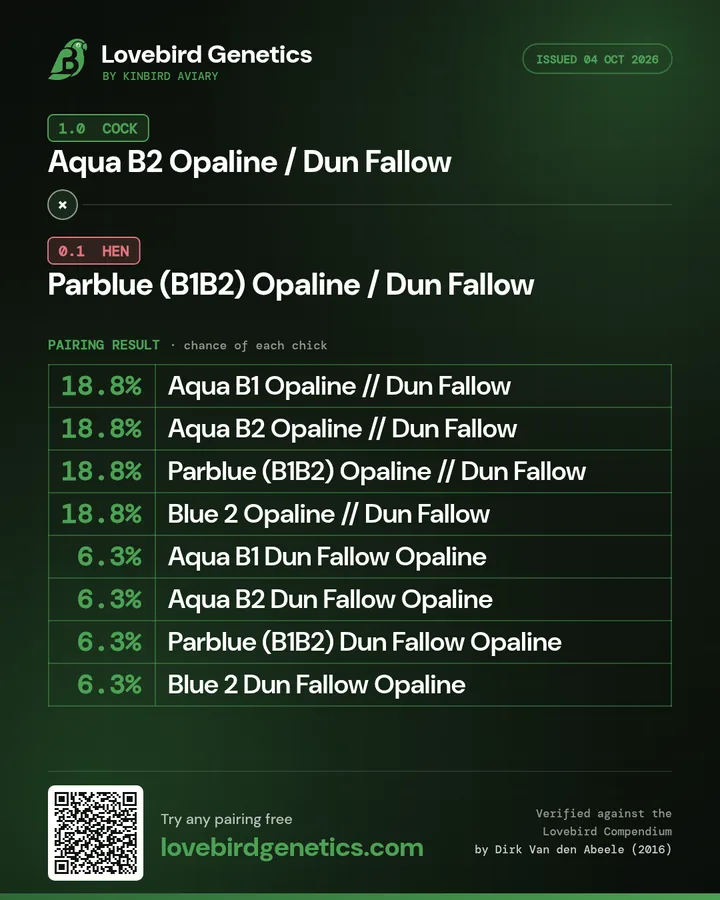
Anyone who scans the QR code lands on the calculator with the cock and hen already selected, so they can check every percentage themselves.
Curious how the percentages are checked? See how every result is verified.
Related mutation guides
Each mutation type has specific quirks, the guides below explain what to look for visually, which combinations are hardest to reach, and which pairings produce the best results:
- Aqua Lovebird Genetics: B1, B2, and Homo Explained, the most common sought-after AR mutation
- Opaline Lovebird Genetics, sex-linked, auto-sexing, popular combinations
- Pale Fallow vs Dun Fallow: What's the Difference?, visually similar AR mutations explained
- Yellow Face Lovebird Genetics, the Yellow Face modifier and how it interacts with other mutations
- Dark Factor (Dark Green, Olive, Cobalt, Mauve), dominant incomplete inheritance explained
- Violet Mutation in Fischer's Lovebirds
- Cinnamon Lovebird Genetics, sex-linked, TRP1 gene, warm plumage tones
- Lutino and Albino (Ino) Lovebird Genetics
- Sex-Linked Mutations: Why Females Can't Be Splits
- What Is a Split Lovebird? Explained Simply
- Aqua Homo × Pale Fallow Sought-after Pairing Guide
References
- Van den Abeele, D. (2016). Lovebird Compendium. Ornitho-Media. ISBN 978-90-822990-0-3.
- Wikipedia contributors. Lovebird. Wikipedia, The Free Encyclopedia. Accessed 2026.
- BirdLife International. Agapornis fischeri, Fischer's Lovebird. BirdLife Species Factsheet. Accessed 2026.